Monday, January 30, 2012

QR-azy for QRs


CeVMS has gone a little QR-azy for QR Codes! They are popping up all over the hallways, in emails, in the cafeteria, and even in the Library. The initial roll-out came after the counselors and librarians were introduced to it during district training sessions. Since then, we just can't seem to get enough.

The counselors are putting up reminders about 4-year planning, testing, schedules, academies, and other important information around the building for students to access.

The library is incorporating QR codes into the Read It Forward program and into fundraising efforts for Dell Children's Hospital. Read more about it on the library webpage here.

Take a look at the great main hallway display:
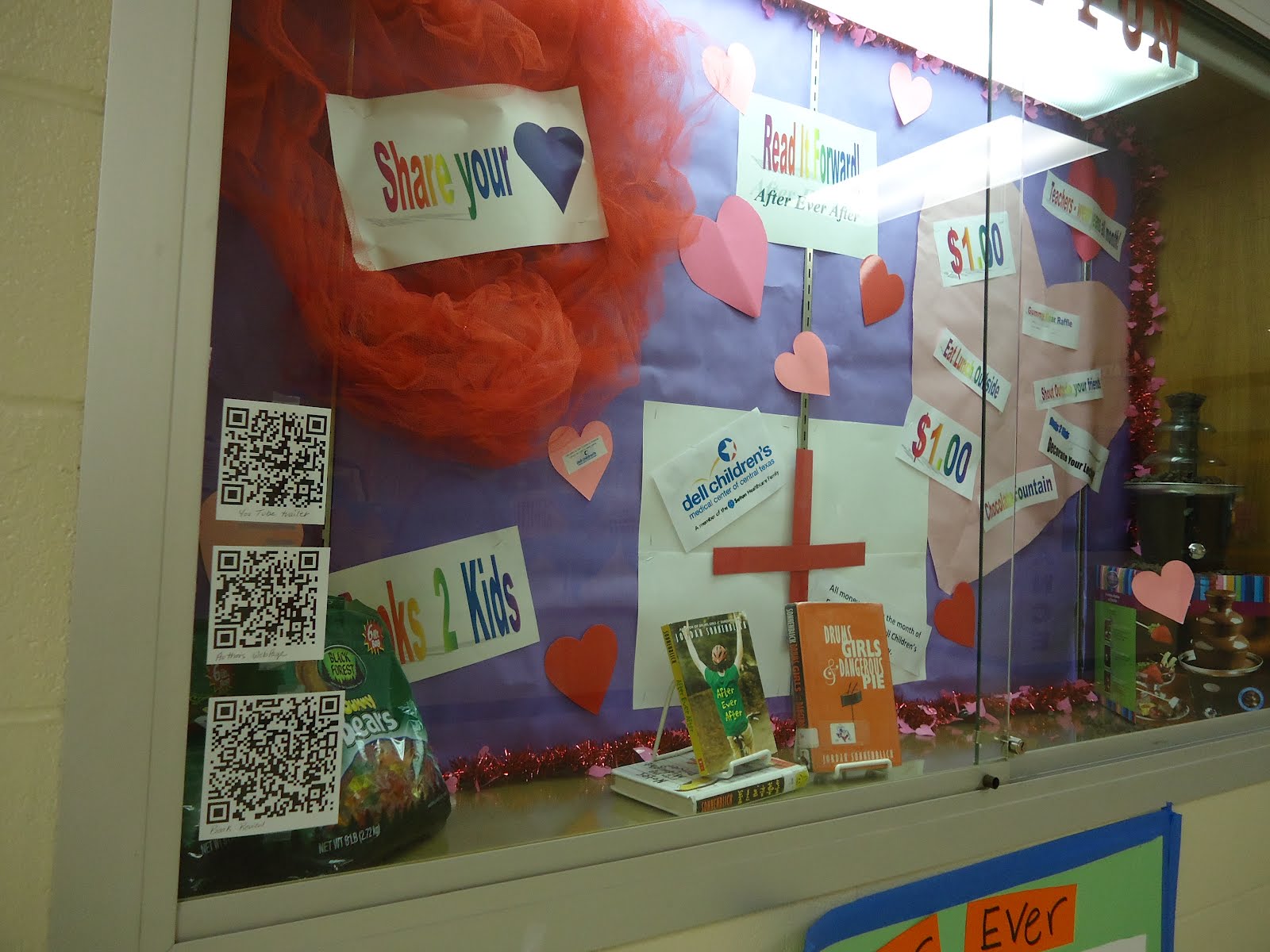

The students are encouraged to scan the QR codes with their cell phones to receive the message encoded in the QR. If they don't have a cell phone or don't want to use it at school., the library has created scanning stations where students log on to a laptop and use software on the computer to scan the codes and capture the information.

Because of the prevalence of this tool, we are even incorporating its use in a classroom perspective into our Professional Development Bootcamp later in February.

Wednesday, January 11, 2012

Ms. Lake's Class is SMART


Ms. Lake has incorporated the use of a SMART board in her FAC class this semester. The students look forward to getting up and interacting with the board daily. They play some of their favorite online, educational games almost daily--and when they use the SMART board, it becomes a whole-body experience!

These picture are of them learning how to work the board:


Sunday, January 1, 2012

TechKNOWLEDGEy Tips: Google Docs/Self-Grading Assessment

I want to post some important links here to help with the Professional Development training. After the fact, I plan on coming back in and filling in more information (more of a tutorial) for those of you who may have missed the session or who'd like to go back on your own and figure things out a little bit.

Here's the important overview of the session:

  1. You need a Google account. If you already have Gmail, just log in with that account and access your files. My suggestion is to go ahead and make a separate "work" account if you don't feel comfortable mixing business with personal life (although Google can help you with that separation in the same account). If you don't have a Google account, then click here to get started.
  2. Next, you'll want a little overview of what Google Docs is. Click here. There is a lot of additional information out there, but sometimes getting it straight from the horse's mouth is best. We probably won't spend much time here in the actual session, but it's interesting information.
  3. We're going to focus on using a template to create a self-graded assessment. Go here to search for templates in your free time. You will not be disappointed in the types of things other people have already (...spent countless hours of their own time...and saving hours of yours...) put together for you. DON'T REINVENT THE WHEEL!
  4. We're going to focus on this one. Click the link above and search for "30 Item Assessment Template."
  5. Now we play. Enjoy!
I'm sure that will more than fill the thirty minutes that are allotted to me in the actual session. Please come back for the next (more extensive) installation of Self-Grading Assessments using Google Docs here on the blog. I'd also love to come visit with you one-on-one and make sure that your needs are met. Call me. :)

Friday, December 16, 2011

Ho! Ho! Ho!

Hey Cedar Valley!

Here's a cool message Santa sent to me especially for you. Click on the link and enjoy!


You want to send one too? You can with PNP - Portable North Pole console! (http://www.portablenorthpole.tv/home) Send personalized Nice or Naughty list messages to special people in your lives. They have options for children or adults. Santa refers to the special person by name. You can add pictures and wish lists for more personalization as well as special reminders. (Make sure to opt out of partner emails....if you want to) My family thinks it's awesome! I'm sure yours will too.

Monday, December 12, 2011

Technology Skills for LIFE

Members of the FAC class are starring in their own Public Service Announcements by creating videos to help peers learn how complete everyday tasks. With a little help from the ITS on production, two of our Cedar Valley Jags are featured in this video:


They figure sometimes you just have to see it to understand it.

The catchy tune in the video was found at: http://www.aquafresh.com/Mom_Experts_Downloads_Songs.aspx

**This is not necessarily an endorsement of the product or what you may find at other areas of the site, but you should consider visiting for other neat teeth brushing activities and resources.**

Friday, December 9, 2011

Think INSIDE the Box

Our Foreign Language department is at it again...but this time they are thinking inside the box--the comic strip box, that is!

The students are working on perfecting their written grammar and conversational wording by creating scenes full of dialog. Using the comic strip creator found at http://www.makebeliefscomix.com/Comix/ students are able to choose from a variety of formats, characters, backgrounds, props and speech bubbles to add to their scenes.


Bonus (TechKNOWLEDGEy Tip):
Here's another idea (perhaps if we decide to have a BYOD--bring your own device--day...) You may want to look into the Sock Puppet App. I read about it here. (She's got a great tutorial!) My kids and I tried it out and it's pretty hilarious. It's definitely another way to think INSIDE the box.


Thursday, December 1, 2011

TechKNOWLEDGEy Tips: 20 x 20

Do you ever feel that your presentations have fallen into a rut? You're always doing that same old thing? Perhaps you have chosen to rely on the comfortable relationship you have with your overhead projector. Perhaps you've flirted a little with other presentation platforms like Prezi. But, in the end when it comes to technology, you always come back to the familiarity of PowerPoint.

This is where I'd like to introduce you to Pecha Kucha: Have you heard of it?

In a nutshell, Pecha Kucha was invented by some architects in Japan who wanted to use a presentation space, had a limited amount of time, and had a lot of presenters who needed to share ideas. They created the 20 x 20 format: 20 slides, 20 seconds each. Presenters have 6 minutes and 40 seconds to get out the information....and then they're done.

Click here for an extended history of Pecha Kucha (right click on the link and choose "Open link in a new window" so that you don't get lost), but make sure to come back to see how it can be used in an educational environment.

I'll wait......

....

....

....You back? Good!

Cool, huh?

Now watch this video. It's an example of the potential of Pecha Kucha in education.


So, some of the cool things I got out of this:
  1. As a teacher, I could use this to introduce a topic and then have time to work with my students.
  2. As a presenter, I have to be concise in my choices and make sure that what I put on the screen really assists me make my point instead of allowing the audience a chance to get totally lost in all the words.
  3. If we were to do this during Staff Development days, we could get a lot of information!!! and no one presenter would feel left out.
  4. I could teach my students this format to present in class and know how many presentations I can get through during one class period.
  5. The format can be modified if needed....
  6. This is a great stepping stone to PODCASTS!!!
Do you want more examples of Pecha Kucha? Of course you do....click here. Think about it. You can do this!